Not later. Reminders that keep asking until they're done.
Most reminder apps ask once and accept “later” forever. Nagbar asks again, then louder: a card from the notch, then your whole screen, until you press Done. Type a reminder or just say it.
Watch the film · 1:26, with sound
- Founding price: first 100 buyers, then $20
- 14-day refund
- No account
- macOS 14+ · Apple silicon
Hold ⌥⌘V and say it, and Ding answers out loud. Or type the same sentence into the panel.
Animation, on a loop: at 6 PM the menu bar ring counts down and a card drops from the top: NOW, Call Mom, due 6:00 PM. Not now is clicked. Five minutes later it's back over the whole screen, Late, 2nd ask, and Done is pressed and held; it turns green. Then how it was added: you hold ⌥⌘V and say “remind me to call Mom at 6, nag me”, Ding, Nagbar's bell, answers out loud “Got it. 6 PM, I'll keep asking.”, and Call Mom lands in today's list.
One promise, start to finish. 86 seconds, with sound.
01 Reminders that nag until done
You can't miss it.
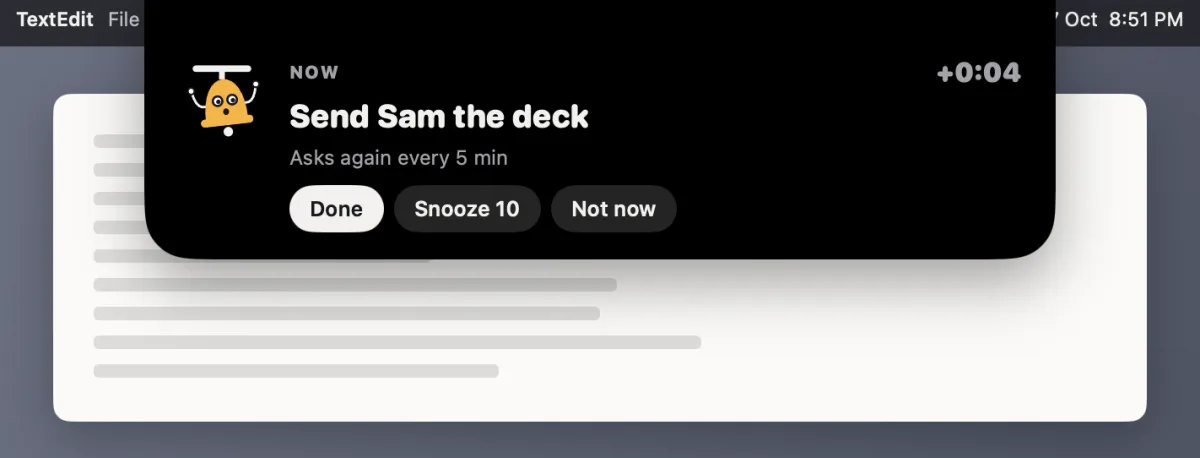
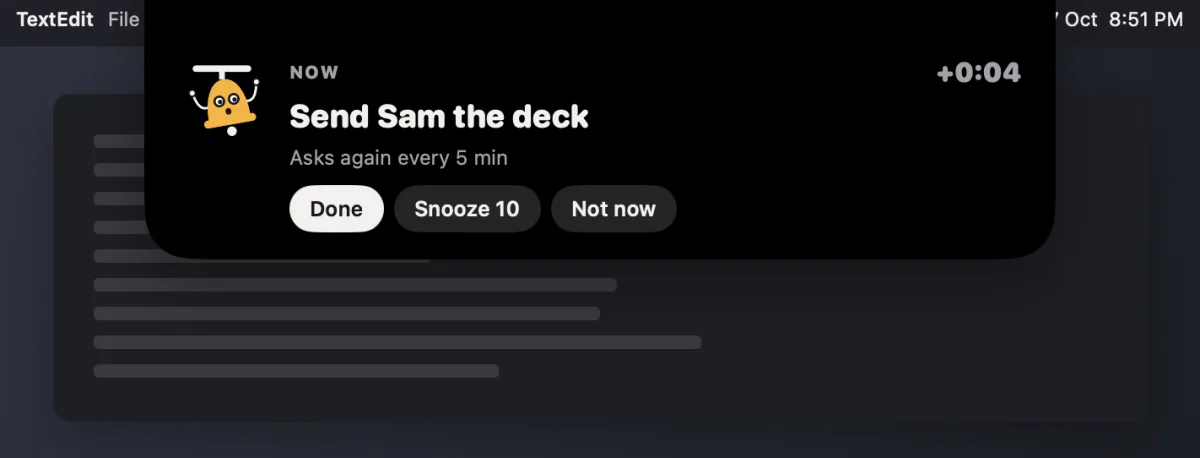
When it's due, a card drops from the notch. Snooze it or let it wait, and the next ask takes the whole screen, on every display, until it's done. Late, the clock counts up. Hold Done, Snooze 10, or Not now, with a click or the keyboard. Or just say “snooze ten”.
Animation: Friday morning, the menu bar ring counts down from 5 minutes to now. Then a card drops from the notch: NOW, Send Sam the deck, due 9:00 AM, with Done, Snooze 10, More and Not now. Return presses Snooze 10; the card goes back up into the notch and comes back ten minutes later over the whole screen, counting up from +10:00. Done is pressed and held, and the screen turns green.
- Every displayOver full-screen apps and every screen you have.
- Asks until doneAgain every few minutes, with a daily cap, and “Still want this?” after a few Not nows.
- Backs off on callsOn a call or presenting, an alert stays a card at the top, with a soft sound, and never takes the keyboard.
- Gentle, Firm, SavageHow it talks when you're late. Meds never get Savage.
- Meetings: one click to joinEvery calendar on your Mac, with Join right on the alert.
- No limitsAs many reminders that nag as you like, and repeating ones, every day, week or month.
02 Your Mac's voice assistant
One voice for your whole Mac.
Hold ⌥⌘V and say it. Nagbar does it, then tells you out loud what it did, in one of 11 voices that run on your Mac. English, Spanish, French, German, Portuguese, Italian and Hindi.
- Reminders and calendar add, move, snooze, done, join.
remind me at 6 to call Mom, nag me
move the dentist to 5
join
done
- Your day
what's next?
, orwhat's today?
to open today's list. - Your Mac Do Not Disturb, keep awake, the focus timer.
turn on Do Not Disturb for an hour
keep my Mac awake for an hour
- Edit by voice select text, hold right ⌘:
summarise this in two lines
,make it friendlier
, or write something new. - Do it for me hands a due task to Claude or ChatGPT. You review it; nothing is sent by itself.
You can also type the same sentences into the panel.
Animation: five things said to Nagbar. “Move the dentist to 5”: the Dentist moves from 3:00 PM to 5:00 PM in today's list. “What's next?”: Nagbar answers that the design review is at 9:30, in 19 minutes. “Turn on Do Not Disturb for an hour”: Do Not Disturb turns on. A paragraph in Notes is selected, right ⌘ is held, and “summarise this in two lines” replaces it with two lines. “Do it for me” on a due reminder, Reply to Jordan about the invoice: the task opens in a new Claude chat, ready to review, and nothing is sent.
03 Hears what you promise
It hears what you promise.
You dictate a reply. Nagbar reads that line, notices the promise, and offers the reminder with the date it understood. Nothing is added without your click, unless you turn on auto-add for clear ones. Unsure ones wait in Found.
- Reads only what you dictate, on your Mac. Never the rest of the chat, and never in password fields.
- At most one card in ten minutes.
- Kept on this Mac for 7 days. It learns from No.
Animation: Alex asks in Slack for the deck to reach Sam before Friday. You dictate “Sure, I'll send Sam the deck by Friday”; the dictation bar types it into Slack. The rest of the chat fades back, because Nagbar reads only the line you dictated. Nagbar's card asks “Remind you? Send Sam the deck, Fri 9 AM”. Nothing is added until Remind me is clicked; then the card says “Added · Send Sam the deck · Fri 9 AM”.
04 Dictation, in any app
Type with your voice. Anywhere.
Hold the right ⌥ key, talk, let go. Your words land where your cursor is, cleaned up. Pick a style: 11 built in, and your own.
- Clean your words, minus the ums and the false starts
- Email a greeting, your paragraph, “Best,” and your first name
- To-dos a checklist Nagbar can turn into reminders
Unlimited, in every style. Restyle anything later from History.
Animation: you say “Um, so can you send the invoice to Alex by Friday, actually no, Thursday, and cc Mia.” Clean types “Can you send the invoice to Alex by Thursday and cc Mia?” into Slack. Email types “Hi, Could you send the invoice to Alex by Thursday and cc Mia? Best, Jamie” into Mail. To-dos types “- [ ] Send the invoice to Alex by Thursday” and “- [ ] Cc Mia” into Notes.
- PrivateSpeech becomes text on your Mac's Neural Engine. The audio is never recorded or kept.
- Spelled rightSix built-in word lists, about 8,900 names and terms, plus your own: “when I say this, type that”.
- CarefulNever types into a password field, puts your clipboard back, and keeps AirPods sounding right.
05 The app
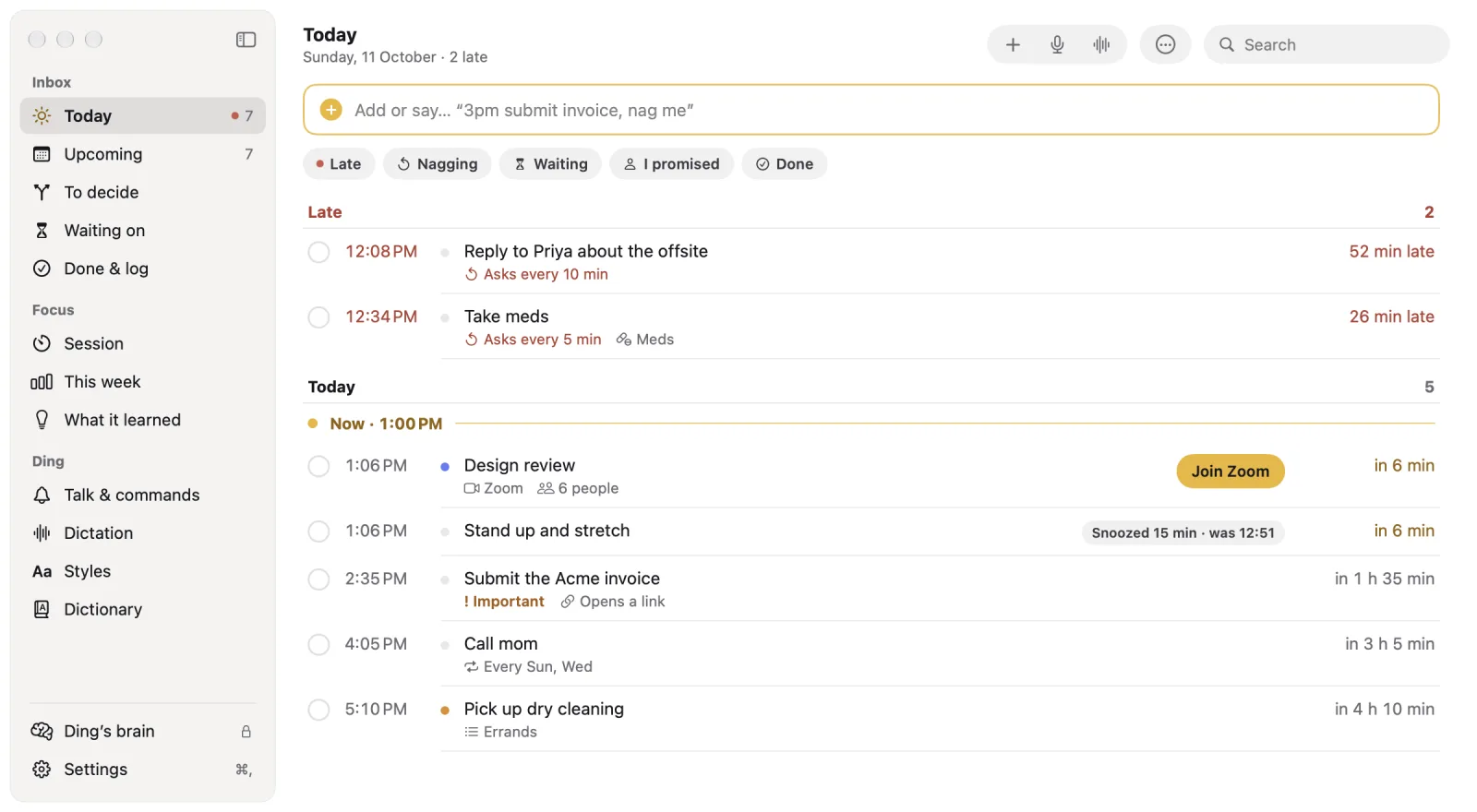
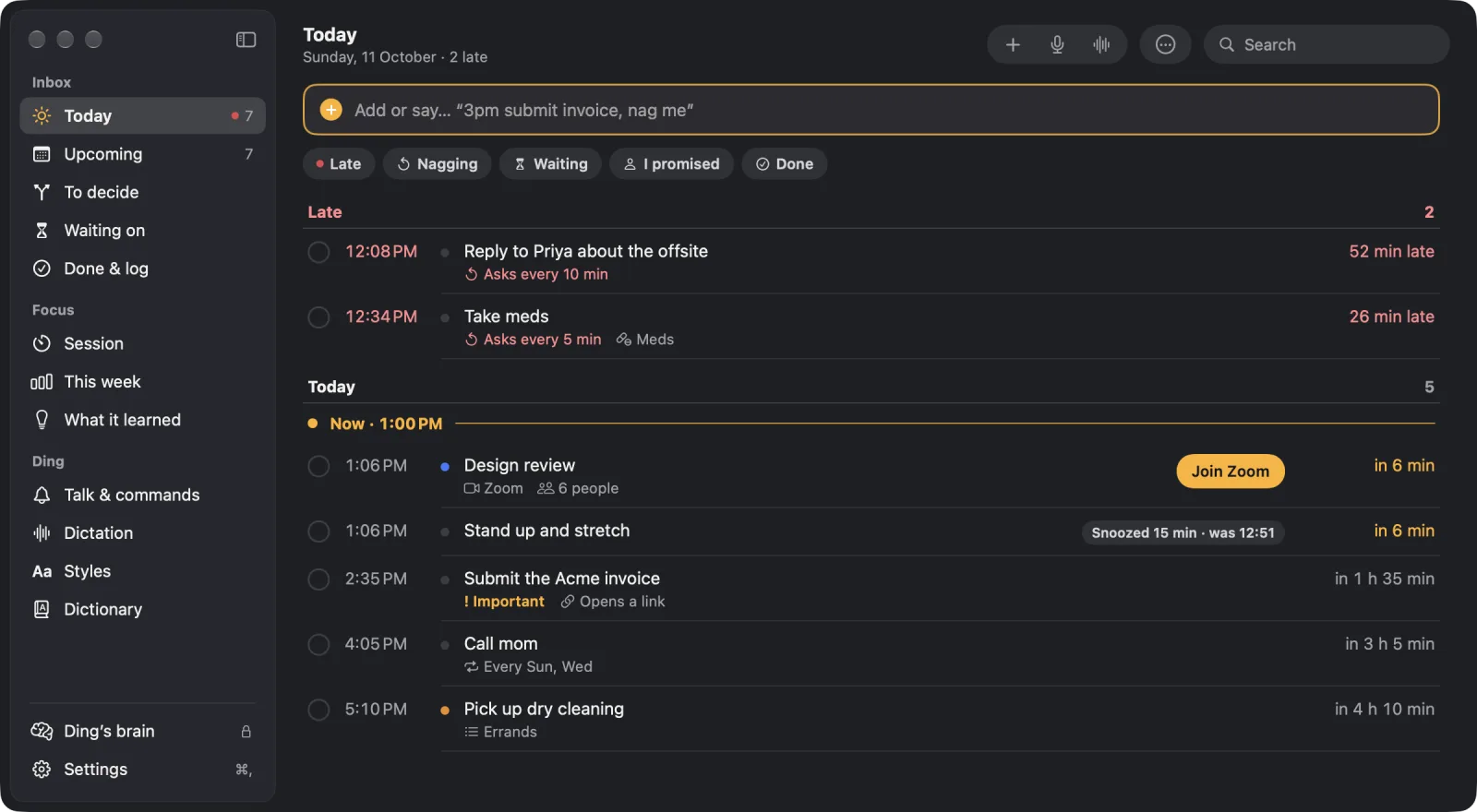
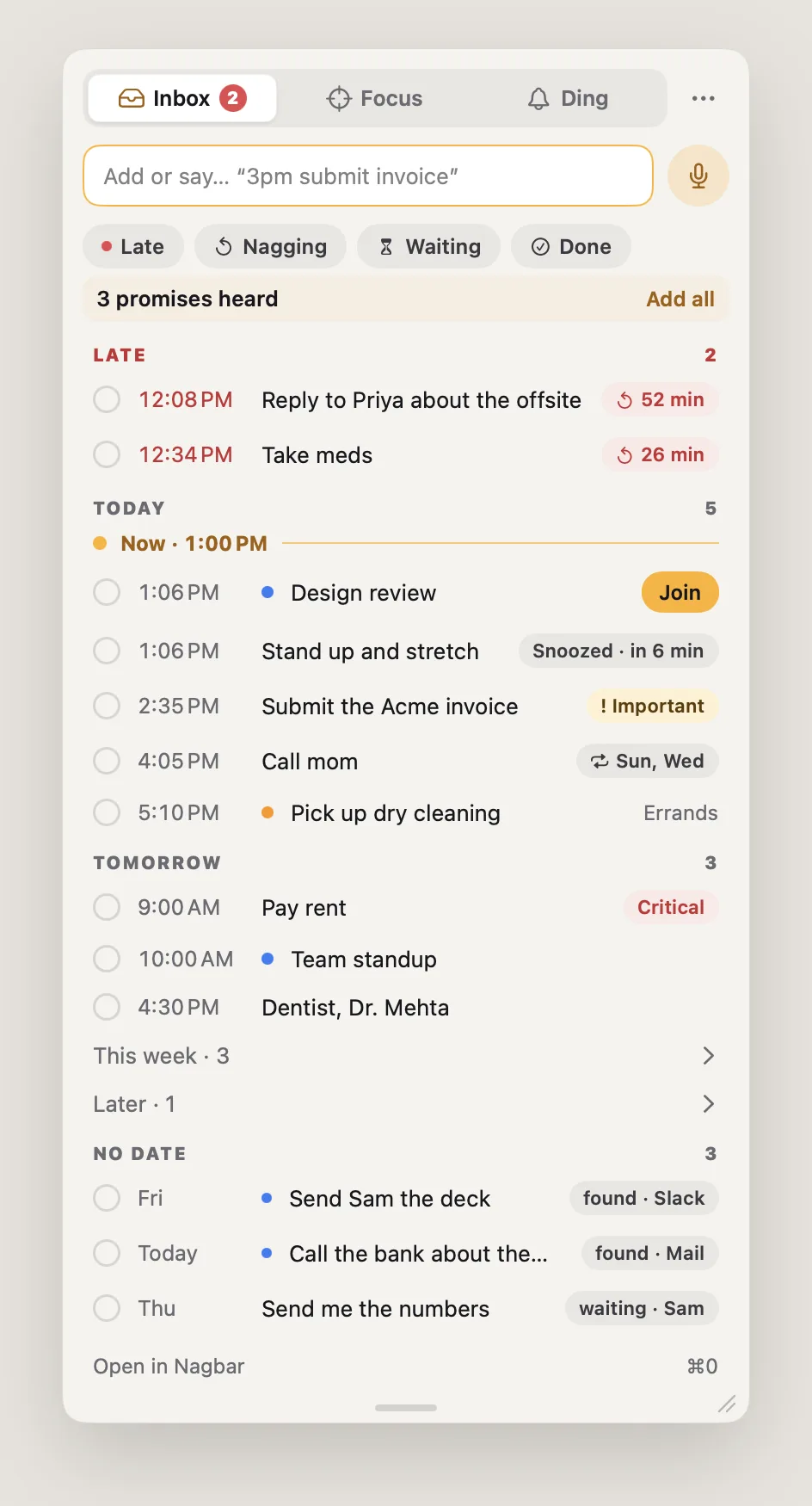
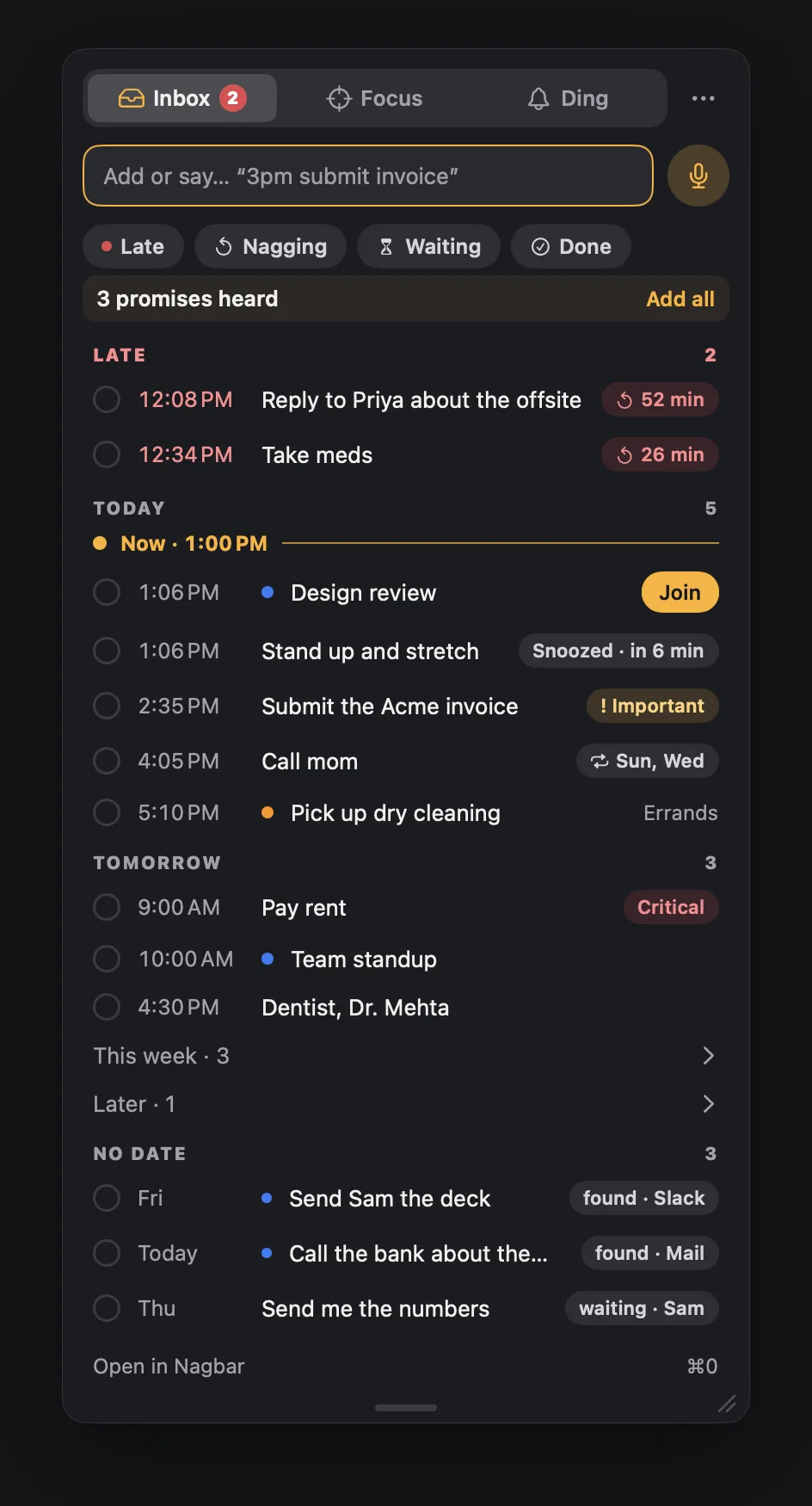
Your day in one place.
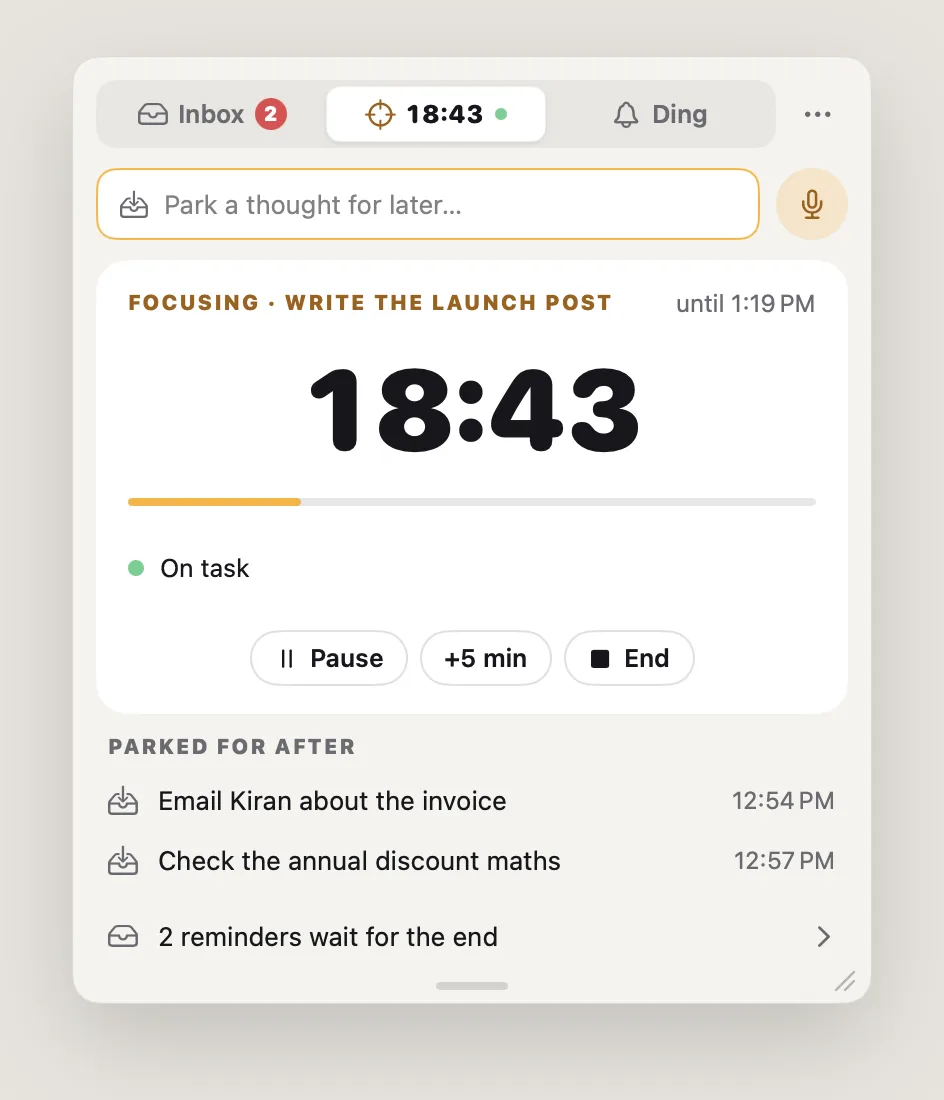
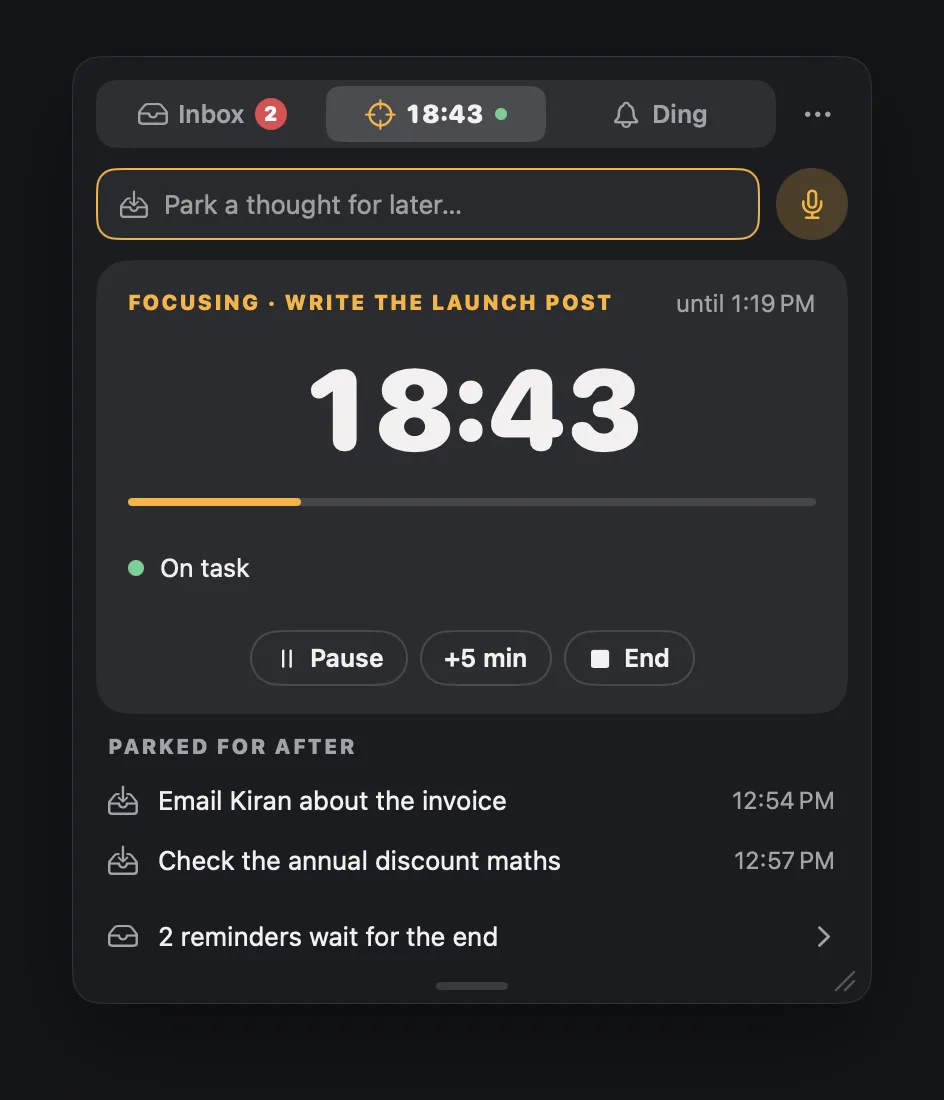
A panel in the menu bar and a window for the week. These are the app itself, drawn from sample data.
06 Private, and your call
Speech never leaves your Mac. No account.
- Your voicewhile you hold the key. Never recorded, never kept.
- Neural Enginespeech to text, on the Mac.
- Your styleby a model on your Mac: Apple Intelligence, or one Nagbar downloads.
- Your cursortyped where you type. History stays here, 30 days.
What does go online
- Your licence check, about once a week, with the store (Polar). Being offline never locks Nagbar.
- The current price, read from this website when Nagbar shows its buy window.
- Model downloads, once each, when you choose them. The speech model is about 450 MB.
- Update checks, about once a day, and new versions download by themselves: which version of Nagbar is asking, nothing about you.
- Feedback, only when you press Send: what you wrote, your email if you give one, and Nagbar’s version, macOS and Free or Pro if you leave that ticked.
- Your words, only when you hand them off: “Do it for me” and the Claude connector send what you choose to the AI you picked.
No analytics, ads or tracking in the app, and no cookies on this site. Read the privacy page
Your model
Your Mac. Your model. Your call.
Nagbar's AI runs on your Mac, and you choose which model does the work. Pick the one your Mac has room for, and switch any time in Settings › You › Ding's brain.
- No model? Nagbar's own rules still tidy your words.
- No extra cost for the models. Each downloads once, then it all runs on your Mac.
- Every rewrite is checked before it's typed: names, dates and numbers stay.
- No model: Nagbar's own rules tidy your words. Always there.
- Apple Intelligence: built into macOS 26 on Macs that have it. No download.
- Qwen3.5 0.8B, light: for Macs with 8 GB of memory. A 533 MB download.
- Qwen3.5 2B, balanced: for 12 GB and up. A 1.3 GB download.
- Qwen3.5 4B, best: for 16 GB and up. A 2.7 GB download.
Animation: Ding's brain, in Settings. You dictate “Um, so tell the team the launch moves to Thursday, actually no, Friday, and uh we still need the final numbers from Alex.” With no model, Nagbar's rules type “So tell the team the launch moves to Friday, and we still need the final numbers from Alex.” The choice then moves down the list as the Mac's memory grows from 8 to 32 GB: Apple Intelligence, Qwen3.5 0.8B, 2B and 4B, and the Professional rewrite gets better each time, ending with “Please let the team know the launch has moved to Friday. We're still waiting on the final numbers from Alex.” At 32 GB every model fits.
No model? Still works.
Nagbar's own rules clean up your words and read your commands with no model at all. A model costs nothing extra when you want one.
Speech, your way
English (the most accurate) or Multilingual for 25 European languages, recognised on your Mac's Neural Engine.
Better models keep coming. Each new one is labelled and tested on real dictation first, then pushed to every Nagbar user whose Mac can run it. Your accuracy only goes up.
07 Pricing
Pay once. Keep it for life.
Nagbar is one payment, yours for life. Founding price for our first 100 members: $10 instead of $20. Want to try it first? You have 14 days to ask for a full refund.
Nagbar Founding price
$20 $10 once
Founding price · first 100 members ·
First 100 buyers, then $20. 2 Macs. Every update, and every new feature that runs on your Mac.
Everything on this page.
Buy Nagbar · $102 Macs · every update · 14-day refund
Already bought? Download Nagbar. Your key is in Polar’s email and on your purchases page.
Never miss it
- Reminders that nag until done, and repeating ones, as many as you like
- Meetings from every calendar, with one-click Join
- Alerts that grow to full screen, on every display
- Hears what you promise, and offers the reminder
- Apple Reminders that nag, and new ones saved there for your iPhone
- The countdown in the notch, with Ding
- Gentle, Firm and Savage tones
- A week of Completed, 30 days of alert log
Talk to it
- Add, move, finish and ask by voice, in 7 languages
- Answer alerts out loud, hands-free
- It reads alerts and your briefing out, in 11 voices
- Understands anything you say, with your Mac's model
- Settings and your Mac by voice
Type with your voice
- Dictation in any app, unlimited
- 11 styles, and your own
- Customize any style's instructions
- A style per app; restyle anything in History
- Edit by voice
Focus, and hand it off
- Focus sessions and Stay on task
- Quiet hours, and it backs off on calls
- “Do it for me”: send a due task to Claude or ChatGPT with everything Nagbar knows. You review it; nothing is sent by itself.
- Works with Claude through the built-in connector
- US dollars
- Tax added at checkout where it applies
- Payments by Polar
- No account
- macOS 14 or later, Apple silicon
08 What it replaces
What Nagbar replaces.
What each of these jobs costs on its own, from the apps that sell it today.
| The job | On its own |
|---|---|
| 01A dictation app | $12–15 a monthcloud dictation subscriptions |
| 02A full-screen meeting alert | $4 a monthor about $25 a year |
| 03A notch or menu bar countdown | $15–20 oncenotch and calendar utilities |
| 04Reminders that nag until done | $15 oncea reminders app that keeps asking |
| 05Something that hears your promises | —We haven't found one. |
| Separately | $16–19 a month, plus $30–35 once |
| Nagbar | $10 once |
Prices are what those apps listed on their own sites and the App Store in September 2026, in US dollars.
09 What's new
What shipped.
Every version, newest first. The same notes the app shows when it updates itself.
0.3.0 Nagbar is now paid for new installs. If you already use it, nothing changes for you.
- If you used Nagbar before this update, you keep everything you have. The free version stays free on this Mac, keeps getting updates, and comes with you to a new Mac set up with Migration Assistant.
- A new install opens “Unlock Nagbar” first: buy Nagbar once, or paste the key from your email from Polar. Setup follows, and nothing else runs until then.
- Settings › Account says when a Mac isn’t activated, and moving your key to another Mac now asks first.
0.2.2 Ding moves again, and the notch is readable on every MacBook.
- Ding on the desktop can be dragged again: anywhere on the screen and onto another display, and he stays where you put him.
- On a MacBook with a notch, a toast like “Done · Undo” and an alert’s one-line peek now sit just under the notch, not behind the camera, so you can read them and press Undo.
- The countdown in the notch shows the minutes to your next thing, as the menu bar does: amber under 5 minutes, red when it’s due or late. A late reminder reads “+1:05”, not “in +1:05”. Pro
0.2.1 A new design, Stay on task, and asks that wait for a natural pause.
- A new design. The menu bar shows a ring that fills as your next thing gets close. Alerts grow out of the notch: a card when something is due, full screen only if you don’t answer (meds and critical ones go straight to full screen). The panel has Inbox, Focus and Ding, the main window is new, and Settings fits in five panes.
- When a reminder asks again, it waits for a natural pause between tasks (switching apps, coming back to your Mac, a call ending), 10 minutes at most. Meetings, important ones, meds and anything Right on time still come on the minute; say “at 3 sharp” or “on the dot” to make one Right on time.
- Focus sessions: start one from a reminder (Focus on this), from Apple Reminders or Things, or by telling Ding “I’m starting deep work on the pricing page for 45 minutes”. Park a thought for after, and see at the end how long you stayed on task. Stay on task (beta, Settings › Alerts › Focus and breaks) notices when you drift to a video, a social site or a long chat, asks once, quietly, and offers the way back at the next pause. It never blocks anything.
- More focus in Pro: Resume brings back the exact browser tab, Stay on task learns what belongs to each task, This week shows your focus runs, and Ding says how the session went. Breaks come at a natural pause, never mid-call, and meetings get a wrap-up heads-up and one click back to what you were doing. Free keeps breaks on the plain timer. Pro
- AI agent runs: when a long Claude Code, Codex, Cursor, Gemini CLI or Copilot CLI run finishes or needs you while you’re elsewhere, one card takes you back to it. Connect them in Settings › Sources › Coding agents. Pro
- Moments and your own commands, in the main window under Ding: “deep work for 2 hours” or “I’m joining a call” sets up your Mac for it, then puts it back. Free runs one command of your own; Pro runs the moments and as many commands as you like.
0.2.0 Send Feedback, and updates that download by themselves.
- Send Feedback…: tell us about a bug or an idea from the menu bar menu, Settings › About or Help. It goes straight to Abhishek and Sumit, and only what you type is sent.
- Updates now download by themselves. When one is ready, “Restart to update” appears at the bottom of the window’s sidebar and at the top of the menus; one click installs it.
- Check for Updates… while an update is waiting offers to restart into it.
10 Questions
Anything else?
Email hello@nagbar.app and a person replies.
The app
What do I need?
A Mac with Apple silicon and macOS 14 or later. For styles and understanding what you say, Nagbar uses Apple Intelligence where your Mac has it, or offers a model your Mac's memory can run. The models cost nothing extra.
Does my Mac need a notch?
No. The countdown lives in the menu bar on every Mac, as a ring around the bell. Your next thing can also live in the notch, with a ring and short peeks. Alerts come from the top of the screen either way.
Which calendars and reminders?
Every calendar already on your Mac (iCloud, Google, Outlook and others you've added in macOS) and Apple Reminders, including lists shared with family or a team.
Will it take over my screen during a call?
No. While your mic is in use or you're presenting, an alert stays a card at the top of the screen, with a soft sound, and never takes the keyboard. Quiet hours (10 PM to 8 AM unless you change them) keep nights quiet.
Is it still early?
Yes. Nagbar is at version 0.2 and moving fast. If something's off, use Send Feedback in the app or email hello@nagbar.app, and we'll fix it.
Voice and privacy
Is my voice sent anywhere?
No. Speech becomes text on your Mac, and the audio is never recorded or kept. What you dictate stays in History on your Mac, 30 days unless you change it.
What does “hears what you promise” read?
Only the text you dictate (and sentences you say or type to Nagbar that weren't a command), on your Mac, in the apps where it's on. Never password fields, password managers or secure input. Terminals, code editors and AI chat apps start off. What it finds stays on this Mac and goes after 7 days.
Which languages?
Dictation is English by default, the most accurate setting. Turn on Multilingual for 25 European languages. Talking to Nagbar works in English, Spanish, French, German, Portuguese, Italian and Hindi; languages other than English need Apple Intelligence or a downloaded model.
Is dictation limited?
No. Dictation is unlimited, in all 11 styles and your own. Restyle anything later from History, and edit by voice.
Buying
Can I try it first?
Yes, with the 14-day refund. If Nagbar isn’t for you, email hello@nagbar.app within 14 days of buying for a full refund through Polar.
Is it a subscription?
No. Nagbar is one payment, yours for life: two Macs, every update, and every new feature that runs on your Mac. Our first 100 members pay the founding price of $10 instead of $20.
Is the “left” count real?
Yes. It's counted by the store (Polar), and we show it only when the count answers. If it can't, the page shows no number rather than a made-up one.
What does a key include?
Everything on this page, on two Macs, with every update and every new feature that runs on your Mac. It works offline; Nagbar checks it about once a week.
Refunds?
Within 14 days of buying: email hello@nagbar.app.
Where's my key and the download? And a new Mac?
On Polar's page after you pay, in Polar's email, and on your purchases page. Download Nagbar from the link under the price, open it, and paste the key when it asks, or in Settings › Account › I have a key. A key works on 2 Macs; to bring your reminders to a new one, use Export and Import in Settings › Account.
Do I pay tax?
Prices are in US dollars. Polar, the store, adds tax at checkout where it applies, such as VAT in the EU and UK or sales tax in the US.
Say it.
Nagbar makes sure it happens.
Founding price for the first 100 buyers · 14-day refund · macOS 14 or later · Apple silicon